EML to HTML Converter — View Your Emails in Browser Instantly
Got a saved email you need as a clean web page? Drop it below. This free EML to HTML converter turns .eml, .emlx and Outlook .msg files into standalone HTML documents you can view, copy or download on the spot — 100% locally, nothing uploads.
Drop .eml or .msg files here — or click to choose
Converts instantly on your device. Nothing is uploaded — the result appears below.
How It Works — Convert EML to HTML in 3 Steps
Upload or Drag
Drag an .eml, .emlx or Outlook .msg file into the box above — or click it and pick files from your device. Select several files at once if you like: each message becomes its own tab while you work through them.
Instant Conversion
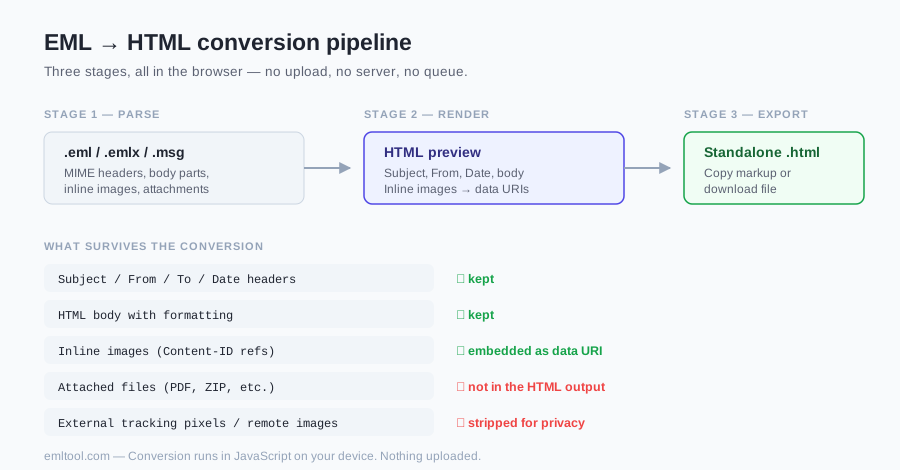
There is no queue and no progress bar to watch. The parser is JavaScript running in the page, so the message is decoded the moment the file lands — subject, sender, date and the formatted body, with inline pictures embedded straight into the result as data URIs.
View, Copy or Download
The converted email renders below the drop zone so you can view it before saving. From there, copy the markup to your clipboard for pasting into a CMS or ticket, or hit Download to save a standalone .html file — single files are free, unlimited, and never watermarked.
Attachments: pictures shown inside the message are embedded into the result, but regular attachments (PDFs, spreadsheets, documents) are not — a web page cannot carry them. Grab those separately with the EML viewer or the attachment extractor before or after converting.
Why Convert EML Files to HTML?
No Software
A saved .eml normally demands a mail client — Outlook, Thunderbird, Apple Mail. Turned into HTML, the same message opens with a double-click in whatever browser is already installed. Nothing to buy, no account to create, no import wizard.
Any Device
HTML is the one document format every phone, tablet and computer understands. Convert once, and the email opens for colleagues on Windows, macOS, Linux, iPhone and Android alike — including people who have never seen an .eml file before.
Preserve Formatting
The conversion keeps text, inline styles, layout tables, links and cid: inline images (as data URIs). Stylesheet blocks, remote images and non-inline attachments do not carry over. A header block records who sent it, to whom, and when.
EML vs HTML — What's the Difference?
An .eml file is a complete transport package: a plain-text MIME container holding the raw headers (the Received chain, Message-ID, authentication results), a plain-text body, an HTML body, and every attachment encoded as base64 — the whole email, exactly as it crossed the wire. An HTML file is just the readable layer: the formatted message a person actually looks at, with none of the machinery around it.
That difference is exactly why converting makes sense for sharing and archiving. The HTML copy opens anywhere and carries its inline images inside itself; the original .eml remains the authoritative artefact, still holding the full headers and the attachments. When a message matters, keep both — the .eml for the record, the converted copy for viewing. Curious about the container format itself? What Is an EML File? walks through it field by field, and the EML viewer lets you inspect headers and save attachments before you convert. Need paper instead of a web page? Use EML to PDF.
Convert EML to HTML without Outlook
Outlook is not required. Drop the .eml (or .emlx / .msg) on the converter above; JavaScript in this tab writes a standalone HTML file with the body and cid: images as data URIs. Regular attachments stay out of the HTML — pull those with the attachment extractor or read the message first in the EML viewer. Need a printable copy instead of a web page? Use EML to PDF.
FAQ
Can I convert multiple EML files at once?
You can load as many files as you like — select several files at once and each email appears as its own tab, already converted. Downloads are per-file: click through the tabs and save each result, free, with no daily cap. What the free page deliberately doesn't do is one-click bulk export. If you routinely need fifty emails processed in one go, that's the Pro batch tool at /pro — it currently outputs PDF (up to 50 emails into a ZIP), and the first 3 conversions are free to try. For a handful of files, the tabs here are honestly quicker.
Is my data safe — are the email files uploaded?
No upload happens at any point. The converter is JavaScript running on your own device: the file is read locally with the browser's file API, parsed locally, and the result is assembled locally. There is no conversion server and no storage — this site is static pages. You can verify that yourself: load the page, switch off Wi-Fi, and conversion keeps working. Because scripts and forms are removed and remote images are blocked by default, the output is actually safer than the raw email — remote images stay blocked unless you explicitly include them. Close the tab and everything parsed goes with it.
What browsers does the converter work in?
Any current browser on any operating system: Chrome, Edge, Firefox and Safari all run the tool, on Windows, macOS, Linux, iPhone and Android — the engine is plain JavaScript, so there is nothing platform-specific about it. The downloaded result is even less demanding: it is a single self-contained document (CSP meta tag and data URIs) that needs no internet connection. Whoever you share it with needs nothing but a double-click.
Related Tools
Need to convert many emails at once? Drop 50 .eml files, get 50 PDFs in a ZIP — one click, still 100% in your browser. Try the first 3 free.
- $9.99 launch pricing — 24-hour batch pass: unlimited files and unlimited re-runs for 24 hours after your first batch finishes.
- $39.99 — lifetime: unlimited batches, forever.
Both one-time. No subscription.