EMLX Viewer — Open Apple Mail Messages on Any Computer
An .emlx file is the per-message file Apple Mail keeps under ~/Library/Mail/V*/<account UUID>/<Mailbox>.mbox/<UUID>/Data/…/<id>.emlx. It is an ordinary email with a length line in front and an Apple plist after it, which is why Windows, Outlook and most viewers choke on it. Drop one below to read the headers, body and any attachments that are actually inside the file. No file leaves your device — parsing runs in this tab.
Drop .eml, .emlx, .msg or .mbox files here — or click to choose
Opens instantly. Your files never leave this device — parsing runs 100% in your browser.
What an .emlx file actually is
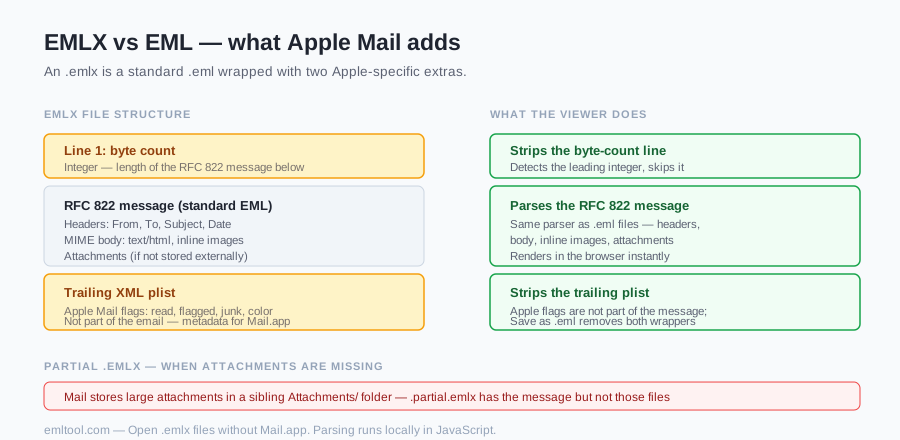
Apple Mail does not store a mailbox the way Outlook does. Each message is a separate file with a numeric name and an .emlx extension. Open one in a text editor and you will see three parts stacked together, not a mysterious binary blob.
The first line is a decimal integer: the byte length of the RFC 822 message that follows. It is bookkeeping for Mail, not part of the email. Next comes the message itself — the same headers and MIME body you would find in a normal .eml file: From, To, Subject, Date, then the plain-text and/or HTML parts, then any attachments that were kept inline. After the message, Mail appends an XML property list starting with <?xml and wrapped in <plist>…</plist>. That plist holds Apple flags: whether the message is read, flagged, marked as junk, and a handful of other mailbox-state bits. They are Mail's notes about the message, not the message.
A cousin named .partial.emlx is the same wrapper around a stub: Mail has already moved the large attachments out into an Attachments/ folder next to the message, so the file you copied is the headers and body without those files. This viewer will still open the stub and show whatever MIME is left inside it. It cannot reconstruct attachments that live in a different folder you did not drop. That limitation is the format, not a bug in the tab.
Where Mail.app keeps them
On a Mac the files sit under your home library, in a path that looks like ~/Library/Mail/V10/<account UUID>/<Mailbox>.mbox/<UUID>/Data/<hashed subdirs>/…/<id>.emlx. The V10 folder name changes with Mail versions — modern Mail uses V7–V10 folders, and you may see whichever shipped with that macOS. The account folder is a UUID, not the pretty name from the sidebar. Inside it, each mailbox is an .mbox bundle, then a UUID, then a hashed Data tree of numbered .emlx files. There is no Messages directory — that was the 10.4-era layout. Matching attachments, when Mail offloaded them, live in an Attachments folder nearby, not inside the message file.
~/Libraryis hidden in Finder by default. The usual route: Finder → Go → Library (hold Option if Library is missing from the menu), then open Mail. Do not rummage in there to "tidy up" a live mailbox — Mail expects that tree to stay put. Copy the .emlx files you need to the desktop or a USB stick, then drop those copies here. Time Machine and some backup tools will already have the same layout if you are recovering mail from an old Mac and no longer have Mail.app running.
Why double-clicking fails on Windows
Windows has no registered application for .emlx. Double-click and you get a picker, Notepad showing a number then headers then a wall of XML, or nothing useful. Outlook does not treat the extension as a message it can import. Apple Mail is not available on Windows. The file is not corrupt; the PC simply has no program that knows the wrapper.
Renaming .emlx to .eml often works for small messages, because many MIME parsers skip a junk first line and ignore trailing garbage after the body. It does not always work. A strict parser sees a line of digits where it wanted a header and gives up. A sloppy one may swallow the plist as part of the body, so you get XML at the bottom of the email. This viewer strips the wrapper on purpose: drop the length line, cut from the last <?xml through </plist>, then parse what remains as RFC 822. You can keep the original filename. Renaming is not required, and it is not a reliable converter on its own.
Attachments: the honest caveat
If the attachment is encoded inside the message — a PDF in a multipart/mixed part, an image referenced with a Content-ID — it shows up in the list under the body and downloads byte-for-byte. That path is the same as a normal .eml file, because after the wrapper is gone that is what you have.
If Mail offloaded the attachment to the Attachments/ folder, it is not in the file you dropped. Those messages are stored as .partial.emlx. Opening the stub here will show the email text and any leftover inline parts; the missing files will not appear, and no download button can create them. Copy the sibling Attachments folder along with the message if you still have the Mac disk. If you only have the stub — a forwarded zip, a single file from a backup — the attachments are gone from this copy. That is worth saying plainly before someone trusts this tab as a full mailbox export.
Convert .emlx to .eml
The middle part of an .emlx file already is a valid .eml message. Conversion is removal, not translation: the length line and trailing plist come off, and what remains is RFC 822 with an .eml extension. Thunderbird, Gmail (as an attachment to yourself), and most other tools will then open it as ordinary mail. This viewer does that strip before it parses, which is why the message on screen is the email and not the wrapper.
Open the file here, then click Save as .eml in the message header. You get the message with the length line and plist already removed. Next to that button are the EML to HTML converter (linked from the message header) and Export PDF through your browser's print dialog. A PDF of the opened message is the paper-shaped export; it is not a substitute for the source file. Keep the .emlx if you still care about Mail's flags. Those live only in the plist we throw away to make the email readable.
FAQ
What is an EMLX file?
An .emlx file is one Apple Mail message stored on disk. Mail does not keep a mailbox as a single database you can copy; each message is its own file under ~/Library/Mail. The file is ordinary RFC 822 email with two Apple extras: a first line that is the byte length of the message, and a trailing XML property list of Mail flags (read, flagged, junk, and similar). Open the file here and click Save as .eml in the message header: you get the message with the length line and plist already removed.
Can I open an .emlx file without a Mac?
Yes. That is the whole point of this page. Windows has no handler for .emlx, Outlook will not import it cleanly, and Mail.app does not exist on a PC or a phone. Drop the file above — Safari, Chrome, Firefox, Edge, desktop or mobile. The parser is JavaScript. Nothing to install, and the file never leaves the device, which matters when the message is work mail you would rather not hand to a conversion website.
Is the .emlx file uploaded to your server?
No. Parsing runs in your browser. There is no upload endpoint for the viewer, no account, and no copy of the message sitting on a machine we run. Close the tab and the bytes are gone from here. That is also why a huge mailbox of .emlx files is a local job, not something to zip up and send to a stranger's converter.
Why are some attachments missing?
Because they were never inside the .emlx. Mail stores large attachments in a sibling Attachments folder and leaves a .partial.emlx behind — a stub of the message without those files. Attachments that stayed inline in the MIME still show up here and download as usual. If the list is empty and you expected a PDF, look next to the message file for an Attachments directory, or open the original mailbox on a Mac. This viewer cannot invent bytes that are not in the file you dropped.
What is a .partial.emlx file?
A .partial.emlx is an Apple Mail message whose bulky attachments were written to a separate Attachments folder to keep the per-message file small. The stub still has the length line, the RFC 822 headers and body, and the plist — so this viewer will open it and show the text. The offloaded files are not in the stub. Rename it to .emlx if your picker is fussy; the wrapper is the same. Recovering the missing attachments means finding the matching files in that Attachments folder, not running a converter.
Can I open several .emlx files at once?
Yes. The drop zone above accepts more than one file; they stack in the sidebar so you can flip between messages. The same viewer on the homepage does the same for a mixed handful of .eml, .emlx and .msg files. There is no separate bulk-upload tool because nothing is uploaded — it is just more files parsed on your device. Hundreds of messages in one go will strain a browser tab; for that, a desktop script over the Mail folder is the honest tool.
Does this viewer show the Apple flags?
The trailing XML plist is stripped so the message itself parses as ordinary email — subject, headers, body, inline attachments. This page is where the flags block is documented: it is Apple's record of read / flagged / junk and related state, not part of the email. The viewer is not a Mail.app flags inspector and does not decode the integer bitmask. The original .emlx on disk still has the XML; we do not rewrite or upload it. Open it in a text editor if you need the raw plist.