Open EML File Online
Drop the .eml, .emlx or .msg below — or click the box and choose the file — to read the message and its attachments in your browser, with no Outlook and no upload.
Drop .eml, .emlx, .msg or .mbox files here — or click to choose
Opens instantly. Your files never leave this device — parsing runs 100% in your browser.
Why a double-click doesn't open it
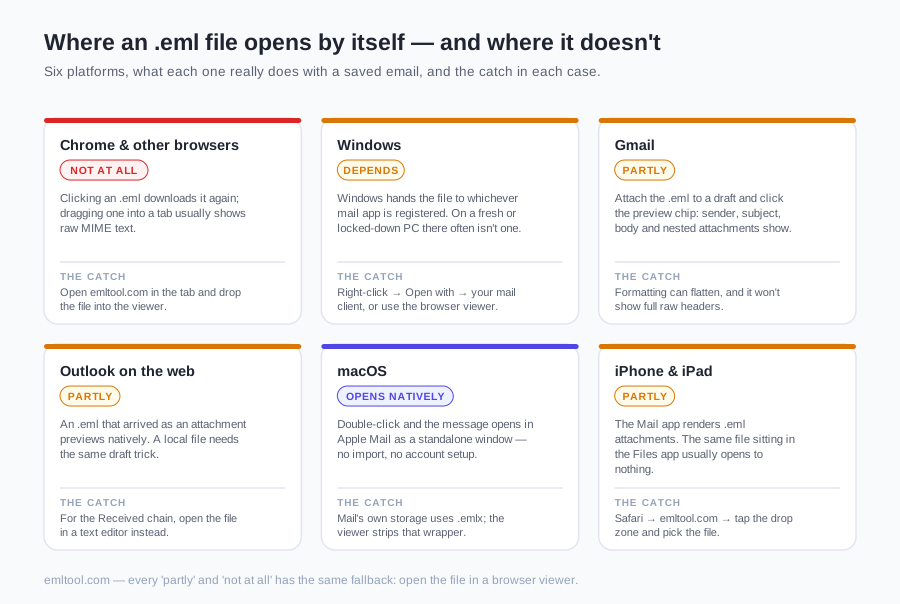
Double-click fails because nothing on the computer has claimed the file, not because the message is damaged. Windows does not render .eml itself. It hands the file to Outlook, or to whichever mail app is the default. On a PC with no Outlook — a locked-down work laptop, or a machine where the old Windows Mail app was removed — you get an app picker, an error, or Notepad full of headers and base64. A Mac with Apple Mail present usually opens a plain .eml in its own window. Finder instead reports that no application is set to open the document when Mail has never been launched, or when the file is Mail's .emlx wrapper rather than a plain .eml. On an iPhone, Mail often previews an .eml that arrived as an attachment inside Mail. The same file in the Files app, or one that arrived by AirDrop, commonly shows a blank preview or the raw source.
You do not need a mail client installed to read one message. Drop the file on the viewer above, or click the box and pick it. It accepts .eml, .emlx and Outlook .msg, and it parses them in this tab: sender, recipients, subject, date, the body, and each attachment with its own download. The file is parsed locally and is not uploaded. Scripts in the HTML are removed, and remote images stay blocked unless you choose Load remote images anyway — the cautious path when the message is a phishing sample you do not want sitting in a live mailbox. The parser code is fetched from the network the first time you drop a file, so this is not an offline tool; what stays on your device is the message itself. The same reader, with less explanation around it, is the EML viewer. Neighbouring pages cover the same stuck file: open a saved message in the browser and read a file your mail app rejected.
If you'd rather not use a tool
The viewer is what works when nothing on the device will open the file. If you would rather stay inside an app you already have, the notes below are the routes that actually work. Each app only has one or two real steps, and none of them shows headers or attachments as clearly as the box above.
In Chrome
Chrome has no built-in renderer for this format. Clicking a link that points at an .eml only downloads it again, and dragging the file into a tab either downloads it once more or shows the raw MIME text. Open this page in Chrome and drop the file on the box above, or click the box and choose it. Edge, Firefox, Safari and Brave work the same way: the browser hosts the viewer and does not display the file on its own.
In Gmail
If you are already in Gmail, start a draft and attach the .eml. Click the attachment chip and Gmail previews the sender, subject, body and any nested attachments. Discard the draft — nothing has to be sent. The preview often flattens formatting and hides the full header block, so use the viewer above when the layout looks wrong.
In Outlook on the web
An .eml that arrived as an attachment in Outlook on the web previews when you click it, including attachments that were inside that message. A file that lives only on your computer needs the same draft trick: attach it, open the preview, then delete the draft. The preview leaves out the raw Received chain and the SPF and DKIM results; those lines sit in plain text at the top of the file, above the first blank line. Desktop Outlook opens an .eml on double-click only when it is already the default mail app, which this web route does not require.
On a Mac
Apple Mail opens a plain .eml on double-click, in its own window, with no account setup and no import. If another app grabs the file, right-click it and choose Open With, then Mail. Mail stores its own copies as .emlx, a thin wrapper around the same message, and the viewer above unwraps that wrapper. If you would rather not launch Mail, use Safari and the box at the top of this page.
On an iPhone
Mail on iPhone usually previews an .eml that arrived as an attachment inside the Mail app. A file in the Files app, or one that came in by AirDrop or Downloads, often fails that preview and shows a blank page or the source. Open this page in Safari, tap the drop zone and pick the file, then read the message and save attachments back to Files. The same steps work on iPad, and on Android you can open this page in Chrome or let the Gmail app preview an .eml attachment.
Why won't my EML file open?
When a mail app still will not open the file, or the message looks wrong once it does, the cause is almost always one of these. Match the symptom, then try the viewer above again only after the file itself is intact.
- Double-click does nothing, or Windows asks which app to use. No application is registered for .eml. Point Open with at a mail client only if you want that association from now on. For a single message, skip the association and use the viewer above.
- The file opens as a wall of text. That is the raw MIME source — boundary markers, quoted-printable text and base64 attachments — not a corrupt download. A parser turns those blocks back into a message. What each block means is on our What Is an EML File? page.
- The name ends in .eml.txt, or the extension is missing. Browsers and webmail sometimes rewrite the filename when they save a message. Rename it so it ends in .eml, or drop it in unchanged. The parser reads the structure inside the file and does not trust the extension.
- Accented or CJK text looks like é or empty boxes. Each MIME part declares its own charset, and non-ASCII header text is stored as RFC 2047 encoded words. A plain text editor ignores both. The viewer decodes each part with the charset that part declared.
- The message opens but the body is blank. The HTML body is probably going unread, so you are looking at a missing or empty text/plain part. In the viewer, switch to HTML when that button is offered. If the file truly has no HTML part, Plain text is all there is.
- Attachments are missing. Either the sending client dropped them when the message was forwarded inline, or the download was cut off. Compare the file size with what the sender expects. A partial file is the usual reason, and no viewer can restore bytes that were never saved.
- Inline images do not appear. Images referenced with cid: live inside the file and should show. Images referenced by an https URL stay blocked, because fetching them can tell the sender that you opened the message and can reveal your IP address. Use Load remote images anyway only when you trust the sender.
If the download itself was cut off, download the file again before you try a viewer. No tool can invent bytes that never arrived, and that one step fixes a lot of files people describe as broken.
After the message is readable
Reading the message is usually only the first step. Every attachment is listed with its filename, type and size, and each has a download, including a nested message saved as its own .eml. For a copy you can file with a claim or a client record, use Export PDF and choose Save as PDF in the print dialog — the click-path is on EML to PDF.
If the headers, boundaries and encodings are what you actually need, What Is an EML File? walks the format field by field. An Outlook .msg is a different problem: it is binary, and renaming it to .eml does not change the bytes. The MSG viewer reads that format, and the box above accepts .msg as well.
FAQ
Why won't my EML file open when I double-click it?
Because no application is registered for that extension. Without Outlook, Thunderbird or Apple Mail set up to take it, the system shows an error, an app picker, or the raw text. Drop the file on the viewer at the top of this page. It reads .eml, .emlx and .msg in the browser and does not upload the file.
Can Chrome open EML files directly?
No. Chrome has no built-in renderer. A click downloads the file again, and dropping it into a tab shows MIME source or starts another download. Open this page in Chrome and use the drop zone above.
How do I open an EML file without Outlook?
Use the viewer on this page. It runs in the browser on Windows, Mac and phones, and the file is parsed locally. Gmail can preview an .eml attached to a draft you then discard. Thunderbird is worth installing only when you have an archive to work through, not for one message.
Can I open EML files on an iPhone or Android?
Yes. On an iPhone, Mail previews some attachments but often fails for a file in the Files app — open this page in Safari and use the file picker. On Android, open this page in Chrome and pick the file from Downloads. The Gmail app also previews many .eml attachments.
My EML file downloaded as a .txt — how do I open it?
Some browsers and webmail systems append .txt, or strip the extension, when they save a message. Rename it so the name ends in .eml, or drop the file in as it is. The parser reads the MIME structure inside the file and does not rely on the extension.
How do I open several EML files at once?
Select them and drop the batch on the viewer above. Each one appears in the Opened emails list and you can switch between them. For a folder you will return to for weeks, Thunderbird and an import is the better tool. This page reads the messages; it does not batch-export a whole folder to PDF.