EML Viewer — Open EML, EMLX & MSG Email Files Online
A free online EML viewer that opens .eml, .emlx and Outlook .msg files instantly — no mail app, no sign-up, no install. Drop a file below to read the message, inspect the headers, preview inline images and download attachments. 100% in your browser — nothing uploads.
Drop .eml, .emlx, .msg or .mbox files here — or click to choose
Opens instantly. Your files never leave this device — parsing runs 100% in your browser.
How to use this free online EML viewer
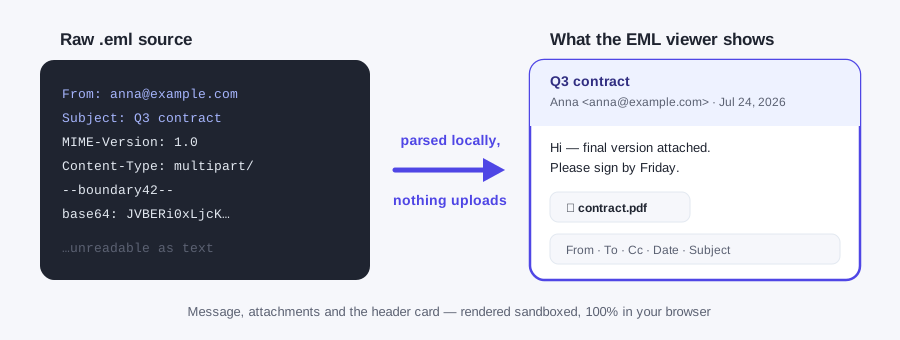
Drop your file. Drag an .eml, .emlx or .msg file into the box above — or click the box and choose files. You can open several at once; they stack up in a list on the left so you can flip between messages.
Read the email. The viewer shows a header card (From, To, Cc, Date, Subject) and renders the HTML body exactly as a mail client would — with a Plain text tab if you prefer the raw text version.
Grab the attachments. Every attachment is listed with its name, type and size. Click Download to save any of them to your device.
Export to PDF if you need a copy. The Export PDF button opens a clean print view of the message — choose 'Save as PDF' in your browser's print dialog to keep a permanent, shareable copy.
Why you need an EML file viewer at all
EML is the near-universal format for a saved email — Gmail, Outlook, Thunderbird and Apple Mail all produce it when you download or export a single message. The catch: once an email leaves the mail app, almost nothing on a normal computer will open it. Double-click an .eml file on Windows and it tries to launch Outlook or Windows Mail; on a work machine without a configured mail client you get an error or a wall of raw MIME text in Notepad. Browsers are no help either — Chrome simply re-downloads the file instead of displaying it.
That's the gap an online EML viewer fills. Situations where this page earns its keep:
- A colleague forwarded an email as an attachment. Many corporate mail systems attach the original message as an .eml file. If your webmail won't preview it, this viewer will.
- You're digging through an email archive or backup. Exports from Gmail Takeout, Thunderbird folders or e-discovery tools arrive as piles of .eml files. Open them here one by one — or several at once — without importing anything into a mail client.
- You need to inspect a suspicious email safely. Saved a phishing sample? The viewer renders it in a sandboxed frame, strips active content and blocks remote resources by default. You can inspect the sender, recipients and date without firing the sender's tracking pixel. For the full Received chain, open the same file in a text editor: it is plain text at the top.
- You got a .msg file but don't have Outlook. Outlook's proprietary .msg format is even less portable than .eml. This viewer opens both — no Outlook licence required.
- You need the email as evidence or a record. Open the file, hit Export PDF, and you have a clean, printable copy with the sender, date and full body preserved.
What this EML file viewer shows you
From, To, Cc, Reply-To, Subject and Date — with international (RFC 2047) encoded names decoded properly, so 'José García' doesn't render as line noise.
Formatted mail in a sandboxed frame. Inline cid: images stay visible; remote images, CSS, fonts, media and SVG are blocked by default.
Every email's text/plain alternative one click away — handy for copying quotes or reading a heavily-designed newsletter as clean text.
Every attachment listed by name, MIME type and size, each with a one-click download. Nested .eml messages attached to the email are extracted too.
Open a whole folder's worth of saved emails in one session and switch between them in the sidebar — nothing to import, nothing to clean up afterwards.
A print-optimized view of the current email, one click away. Use your browser's 'Save as PDF' to archive or share the message.
Private by architecture — not by promise
Most "free online viewer" sites work by uploading your file to their server, converting it there, and showing you the result. For email that should give you pause: a single .eml file can contain your correspondence, other people's addresses, internal documents and legal material. You shouldn't have to trust a stranger's server with that just to read a message.
This viewer takes the other route: the parser is JavaScript running on your own device. The file is read locally, decoded locally, and rendered locally. There is no upload endpoint — the site is static pages. That's also why it's fast (no upload wait, even for a 25 MB email full of attachments) and why it keeps working if you cut your internet connection after the page loads. Remote resources carried by an email are blocked by default; if you explicitly load remote images, that sender-controlled host can receive your IP address, browser details and open time. When you close the tab, the parsed file is gone; nothing is stored by this site.
EML, EMLX and MSG — what's the difference?
| Ext | What it is, and where it comes from |
|---|---|
| .eml | The standard 'one saved email' format — a plain-text MIME (RFC 822) file with headers, body and base64-encoded attachments. Produced by Gmail ('Download message'), Outlook, Thunderbird and most mail servers. Read more on our What Is an EML File page. |
| .emlx | Apple Mail's variant, used internally on macOS — an .eml message wrapped with a length prefix and a property-list footer. This viewer strips the wrapper automatically. |
| .msg | Microsoft Outlook's proprietary binary format (an OLE compound file, not readable as text). Needs a dedicated parser — which this viewer includes, so .msg files open here just like .eml. Details on the MSG viewer page. |
Opening EML files in Chrome, Edge or Safari
Browsers used to display .eml files natively; current Chrome and Edge no longer do — double-clicking an .eml either triggers a download prompt or shows raw MIME source, and the old rename-to-.mht trick died when MHT support was removed. The browser itself no longer ships a MIME parser for email.
That's exactly the gap this page fills: keep this tab open and drag any .eml, .emlx or .msg file onto it — parsing happens in JavaScript inside the tab, so it works in Chrome, Edge, Safari and Firefox alike, on any OS. You can drop several files at once; they stack in the sidebar so you can click between messages.
FAQ
What is an EML viewer?
An EML viewer is a tool that opens .eml email files — the standard format used when you save or export a single email message — and displays them the way your mail app would: sender, recipients, subject, date, the formatted message body and any attachments. This page is a free online EML viewer that runs entirely in your browser.
Is this online EML viewer really free?
Yes. Opening and converting a single email is free — no sign-up, no watermarks, no daily cap. Turning a whole folder into PDFs is a separate Pro batch job (try 3 files free, then from $9.99). The viewer stays free because parsing runs on your device.
Are my email files uploaded to your server?
No. Files are parsed 100% in your browser using JavaScript — nothing is uploaded anywhere. You can verify this yourself: load the page, disconnect from the internet, and the viewer keeps working. Your emails, attachments and headers never leave your device.
Can I open Outlook .msg files too?
Yes. Alongside .eml and .emlx, the viewer reads Outlook's proprietary .msg format directly in the browser — sender, subject, body and attachments included. See the MSG viewer page for details on how .msg differs from .eml.
How do I open an EML file in Chrome?
Chrome can't render .eml files natively — clicking one usually just downloads it again. The fix: open this page in Chrome, then drag the .eml file into the drop zone (or click it and pick the file). The email renders instantly. Step-by-step instructions are on our How to Open an EML File page.
Can I save the email as a PDF?
Yes. Open the email, click 'Export PDF', and your browser's print dialog opens with a clean, print-friendly copy of the message — choose 'Save as PDF' as the destination. Headers, body and formatting are preserved.
Can I view attachments inside the EML file?
Yes. Every attachment in the message is listed with its filename, type and size, and each has a download button. Inline images referenced by the email body (cid: images) are displayed in place inside the message, just like in a mail client.
Does the viewer run scripts inside the email?
No. Scripts, forms, remote CSS, fonts, media and SVG are removed or blocked. Remote images are blocked by default too; the viewer only fetches them if you explicitly choose 'Load remote images anyway', which can reveal your IP address, browser details and open time to the sender.
How do I open an EML file without Outlook?
Use EML Tool, which runs in your browser, no upload, and drop the .eml file on this page. The subject, sender, body, and attachments show up without a desktop mail app. The same viewer also opens .emlx files and Outlook .msg files. After the page has loaded you can disconnect and still read the message, because parsing stays in the tab.
How do I open an EML file on a Mac?
Open it in EML Tool, which runs in your browser, no upload, using Safari, Chrome, or Firefox on the Mac. Drop the file on this page. You get the header card, the HTML body, and a download for each attachment. The file stays on the computer while the message is parsed in the tab.
How do I read an EML file on my phone?
Read it in EML Tool, which runs in your browser, no upload, on iPhone or Android the same way as on a computer. Open this page, choose the .eml from Files or Downloads, and the message renders in the tab. Attachments can be saved to the phone. The file stays on the device, and there is no separate app to install.
How do I open an EMLX file from Apple Mail?
Open it in EML Tool, which runs in your browser, no upload, the same way you open an .eml file. Apple Mail can save a message as .emlx, and this page reads that file along with .eml and Outlook .msg. Drop it on the page to see the sender, the body, and the attachments. The file stays on your device while it is parsed.
Is it safe to open an EML file online?
Yes, when you open it in EML Tool, which runs in your browser, no upload, so the file stays on the device. Scripts, forms, and remote images stay blocked unless you choose to load remote images. That choice can show your IP address to the sender, so leave it off for mail you do not trust. Reading the message here does not run code from the email.
How do I open an EML file downloaded from Gmail?
Download the message, then open it in EML Tool, which runs in your browser, no upload. In Gmail, open the message, use the three-dot menu, and choose Download message to save the .eml. Drop that file on this page to read the body and save attachments. The saved file is parsed in the tab on your device.
What free tool opens EML files?
EML Tool does, and it runs in your browser, no upload, with one email free of any account or watermark. Drop an .eml, .emlx, or .msg file on the page to see the sender, recipients, subject, date, body, and attachments. The message is parsed in the tab. A whole folder of PDFs is the separate batch on the Pro page.
How do I see the real sender of an EML file?
Open the file in EML Tool, which runs in your browser, no upload, and read the header card plus the full header text. From, Reply-To, Return-Path, and Received lines are on the page. The viewer keeps the message on your device. Leave remote images off if you do not want the sender to learn that you opened it.
Keep reading
Need to convert many emails at once? Drop 50 .eml files, get 50 PDFs in a ZIP — one click, still 100% in your browser. Try the first 3 free.
- $9.99 launch pricing — 24-hour batch pass: unlimited files and unlimited re-runs for 24 hours after your first batch finishes.
- $39.99 — lifetime: unlimited batches, forever.
Both one-time. No subscription.
$39.99 lifetime, for inboxes you convert more than once. Unlimited EML, EMLX, and MSG to PDF batches, still in the browser, no upload. One-time, on the existing Pro lifetime checkout.
Get the $39.99 batch pack →