MSG Viewer — Open Outlook .msg Files Without Outlook
Someone sent you a .msg file and you don't have Outlook? Drop it below. This free online MSG viewer parses Outlook's binary format right in your browser and shows the message, sender details and attachments. 100% in your browser — nothing uploads.
Drop .eml, .emlx, .msg or .mbox files here — or click to choose
Opens instantly. Your files never leave this device — parsing runs 100% in your browser.
Why .msg files are so awkward
When you drag an email out of Outlook for Windows onto your desktop, Outlook saves it as a .msg file — a Microsoft OLE compound document, essentially a tiny binary filesystem holding the message's properties, body and attachments. Unlike .eml (which is readable text underneath), a .msg opened in a text editor is pure garbage bytes.
That makes .msg files a headache the moment they leave the Outlook ecosystem: Mac users, Gmail users and anyone on a phone can't open them natively. The usual advice is "install Outlook" or "buy a converter app". This page is the simpler answer — a parser for the MSG format that runs as JavaScript in the browser you already have. It reads the sender, recipients, subject, date, the HTML or plain-text body, and unpacks every attachment for download.
How do you open a .msg file without Outlook?
Using the viewer above takes about ten seconds, on any operating system:
Drag the .msg file into the drop zone at the top of this page — or click the zone and pick it from a folder, the Files app or your Downloads.
The message opens: subject, sender, recipients and date in the header card, with the formatted body below it.
Switch between the HTML and Plain text tabs if the message carries both, and download any attachments from the list underneath.
Click Export PDF if you need a copy you can file or send on — it uses your browser's own print-to-PDF, so the result stays local too.
The alternatives, ranked honestly — including the one piece of advice you will find all over the internet that simply does not work:
- Ask the sender to resend it normally. The most reliable fix and the least work. A forwarded message that arrives as ordinary mail — or as an .eml attachment — sidesteps the format entirely.
- Rename it to .eml — no, this does not work. Widely repeated advice that fails, because renaming changes nothing about the bytes inside. A .msg is binary; a MIME parser has nothing to read. Only a real MSG parser helps.
- Classic Outlook for Windows. Opens .msg by double-click, but means a licence and an install for one file — and it does not help a Mac or a phone at all.
- A desktop converter utility. Useful for bulk conversion of hundreds of files. For a single message, an online MSG viewer is faster and does not require trusting an installer.
What is actually inside a .msg file?
A .msg is a Compound File Binary container — the same document format Microsoft used for old .doc and .xls files. Inside it are storages (folders) and streams (files), each holding one MAPI property of the message. The names look cryptic but they are systematic: __substg1.0_ followed by a four-digit property tag and a four-digit type code. Knowing the layout explains both what an MSG viewer can recover and why a text editor never will:
| Storage or stream | What it holds |
|---|---|
| __properties_version1.0 | The property table: fixed-size values such as message flags, sizes and timestamps, plus pointers to everything else in the file. |
| __substg1.0_0037001F | A variable-length property stream. The name encodes what it holds: 0037 is the subject, and 001F means the value is stored as Unicode text. |
| __substg1.0_1000001F / _10130102 | The message bodies — 1000 is the plain-text body, 1013 is the HTML body stored as binary. A third variant, 1009, holds an RTF body in compressed form. |
| __substg1.0_007D001F | The original internet message headers, if Outlook kept them: the Received chain, Message-ID and authentication results, preserved as one long text value. |
| __recip_version1.0_#00000000 | One storage per recipient, numbered in sequence, each with its own display name, address and recipient type (To, Cc or Bcc). |
| __attach_version1.0_#00000000 | One storage per attachment, holding the filename, MIME type and the raw bytes — or, for a forwarded message, an entire nested .msg. |
| __nameid_version1.0 | The mapping for named properties: custom fields added by Outlook, Exchange or third-party add-ins that don't have a fixed numeric tag. |
Two consequences follow from that design. First, nothing about a .msg is self-describing the way a MIME header is — a parser has to know Microsoft's property tags in advance. Second, a .msg can hold things an .eml never could, such as Outlook-specific flags, categories and calendar data. Our viewer uses the open-source msgreader library for this decoding, which is why .msg files open here with no server involved.
MSG vs EML at a glance
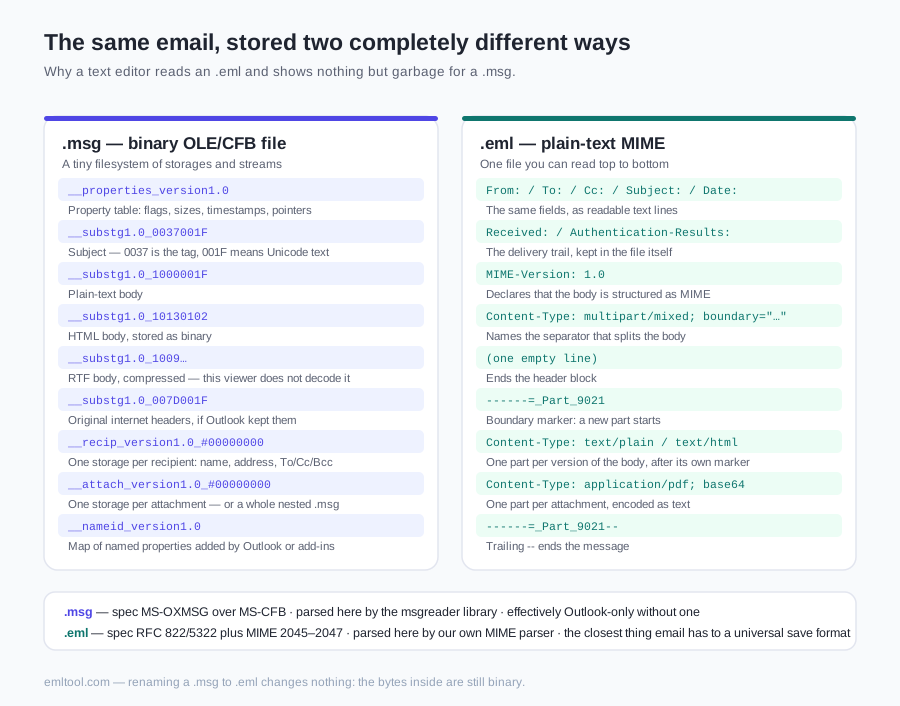
| Aspect | .msg | .eml |
|---|---|---|
| Origin | Outlook for Windows — drag a message to the desktop, or File → Save As | Nearly every other mail system: Gmail, Thunderbird, Apple Mail, mail servers |
| Underlying format | Binary OLE/CFB compound file — a tiny filesystem of storages and streams | Plain-text MIME — open it in a text editor and you can read the headers |
| Specification | Microsoft's MS-OXMSG, layered on the MS-CFB container format | RFC 822/5322 plus MIME (RFC 2045–2047) — open internet standards |
| Portability | Effectively Outlook-only without a dedicated parser | The closest thing email has to a universal save format |
| Body storage | Plain text, HTML and compressed RTF, in separate property streams | MIME parts separated by boundary markers, encoded as base64 or quoted-printable |
| In this viewer | Parsed with the msgreader library — message, recipients, body, attachments | Parsed by our own MIME parser, including the .emlx wrapper variant |
If you have a choice about which format to archive, choose .eml — it will still open in thirty years without anyone's software. What Is an EML File? explains that format in the same detail.
What this MSG viewer can't do yet
Every tool has edges, and we would rather you know ours before you rely on it:
- RTF-only bodies may come up empty. Outlook can store a body as compressed RTF instead of HTML or plain text. We don't decompress that yet, so a message written that way can show headers and attachments but no readable body.
- Full internet headers aren't displayed. Where Outlook preserved them, they exist in the file — but the viewer's header card shows From, To, Cc, Subject and Date rather than the raw Received chain. For header-level forensics, the original .eml of a message is a better artefact than its .msg copy.
- Encrypted and signed messages. An S/MIME-encrypted message is unreadable without its private key, here or anywhere else. Signed messages usually display, but this page does not verify the signature.
- winmail.dat is a different problem. TNEF containers are not .msg files and are not parsed here. See the FAQ below for what to do instead.
- Unusual files, honestly. MSG support is newer than our EML parsing and hasn't been through as many real-world files. If a particular .msg renders oddly, that's a bug on our side — tell us and we'll fix it.
Why does the file stay on your device?
Most search results for opening .msg files online are upload-based: you hand the message to a server, it converts it, and you hope the operator deletes it. Think about what a .msg from an Outlook mailbox usually contains — internal correspondence, colleagues' email addresses, contracts, HR matters, an invoice dispute. That is a strange thing to post to a stranger's machine to answer the question "what does this say?".
This page takes the other route. The MSG parser is JavaScript that your browser downloads once and then runs locally; the file is read with the standard file API, decoded in memory, and rendered — the HTML body inside a sandboxed frame with scripts and auto-loading remote resources blocked. CID images carried inside the file stay visible. If you explicitly load remote images, their host can see your IP address and open time. There is no upload endpoint on this site; close the tab and the parsed file is gone.
FAQ
How can I open a .msg file without Outlook?
Drop it into the viewer on this page. MSG is Outlook's proprietary binary format, so a text editor shows garbage — but this viewer parses the format directly in your browser and shows the sender, subject, body and attachments. No Outlook licence, no install, no upload.
What's the difference between MSG and EML?
EML is an open, text-based standard (MIME/RFC 822) that nearly every mail system can produce and read. MSG is a Microsoft OLE compound binary file used only by Outlook for Windows — dragging a message out of Outlook creates a .msg. EML is portable; MSG generally needs Outlook or a dedicated parser like this one.
Can I convert a MSG file to EML?
Yes. Open the .msg in the viewer above and click Save as .eml in the message header: the file is rebuilt as a standard MIME message — From, To, Cc, Subject, Date, the plain-text and HTML bodies, and the attachments — and downloaded straight from your browser. Outlook-only data such as categories, follow-up flags, the compressed RTF body and the original Received headers is not carried over; the dedicated MSG to EML converter page at /msg-to-eml lists exactly what does and does not survive.
Are .msg attachments supported?
Yes. Attachments embedded in the .msg file are listed with filename, type and size, each with a download button. Inline images referenced by the message body are rendered in place where the file provides them.
Is my .msg file uploaded anywhere?
No. Like the EML viewer, MSG parsing runs 100% in your browser with JavaScript. The file never leaves your device, and closing the tab removes everything from memory.
Why is the message body empty for one of my .msg files?
The most likely cause is a message whose body was stored only as compressed RTF — an older Outlook format we don't currently decompress — rather than as HTML or plain text. It's a real gap, not a corrupted file: the headers and attachments still read correctly. If you hit it, tell us which Outlook version produced the file and we'll work on it.
I have a winmail.dat file, not a .msg — is that the same thing?
No. winmail.dat is TNEF, a different Microsoft container that appears when Outlook sends rich-text mail to a non-Outlook recipient and the formatting plus attachments get packed into one blob. It isn't a .msg. Use the winmail.dat opener on this site to unpack the attachments. The lasting fix is to ask the sender to resend as plain text or HTML.
Can I open a .msg file on a Mac or a phone?
Yes — that's the main reason this page exists. Outlook for Mac won't open a loose .msg reliably and iOS has no handler for it at all, but the parser here is JavaScript, so Safari on a Mac, Safari on an iPhone and Chrome on Android all work the same way: open the page, pick the file, read the message.