What Is an EML File? The Format, Explained
An .eml file is a single email message saved in the internet's native mail format. Here's what's actually inside one, why the format is everywhere, and how it differs from .emlx and .msg. Want to just open yours? Use the free viewer — it runs entirely in your browser.
Drop it into the free viewer — parsed 100% in your browser, nothing uploads, no sign-up.
The format under the hood
EML is not a Microsoft invention or anyone's proprietary format — it's simply an email message as it travels between mail servers, written to disk. The structure comes from RFC 822 (1982, later updated as RFC 2822 and RFC 5322): a block of headers, one per line — From, To, Subject, Date, plus dozens of technical ones like Received and Message-ID — then a blank line, then the body.
Modern emails layer MIME (RFC 2045–2047) on top of that skeleton. MIME is what lets one text file carry rich content: the body is split into partsseparated by boundary markers — typically a plain-text version and an HTML version of the same message, plus one part per attachment. Binary attachments are encoded as base64 text; accented and non-Latin text uses encodings like quoted-printable; subject lines in other languages use RFC 2047 "encoded words". That's why an .eml opened in Notepad shows readable headers followed by walls of seemingly random letters — it's all real data, just encoded for safe text transport.
The payoff of this design: EML is durable and universal. A message saved in 1995 still opens today, and every serious mail tool — plus this site's viewer — can parse it.
What's inside a typical .eml
| Part | What it holds |
|---|---|
| Headers | From, To, Cc, Subject, Date — plus the Received chain (every server the message passed through), Message-ID, and authentication results (SPF/DKIM/DMARC). Gold for verifying where an email really came from. |
| Blank line | A single empty line is the entire separator between the header block and the body. Everything above it is metadata; everything below is content. |
| Text body | The plain-text version of the message. Nearly every email includes one alongside the HTML. |
| HTML body | The formatted version — fonts, colors, layout tables, images. What your mail app actually displays. |
| Inline images | Images embedded in the design, referenced by cid: identifiers and carried as base64 parts inside the same file. |
| Attachments | Any files attached to the email, base64-encoded with their filename and MIME type — PDFs, spreadsheets, even other .eml messages. |
What does an EML file look like from the inside?
Below is the skeleton of a real multipart message, trimmed for length. Reading it top to bottom explains most of what confuses people about the format: the header block, the single blank line that ends it, then one boundary-delimited part per version of the body and per attachment.
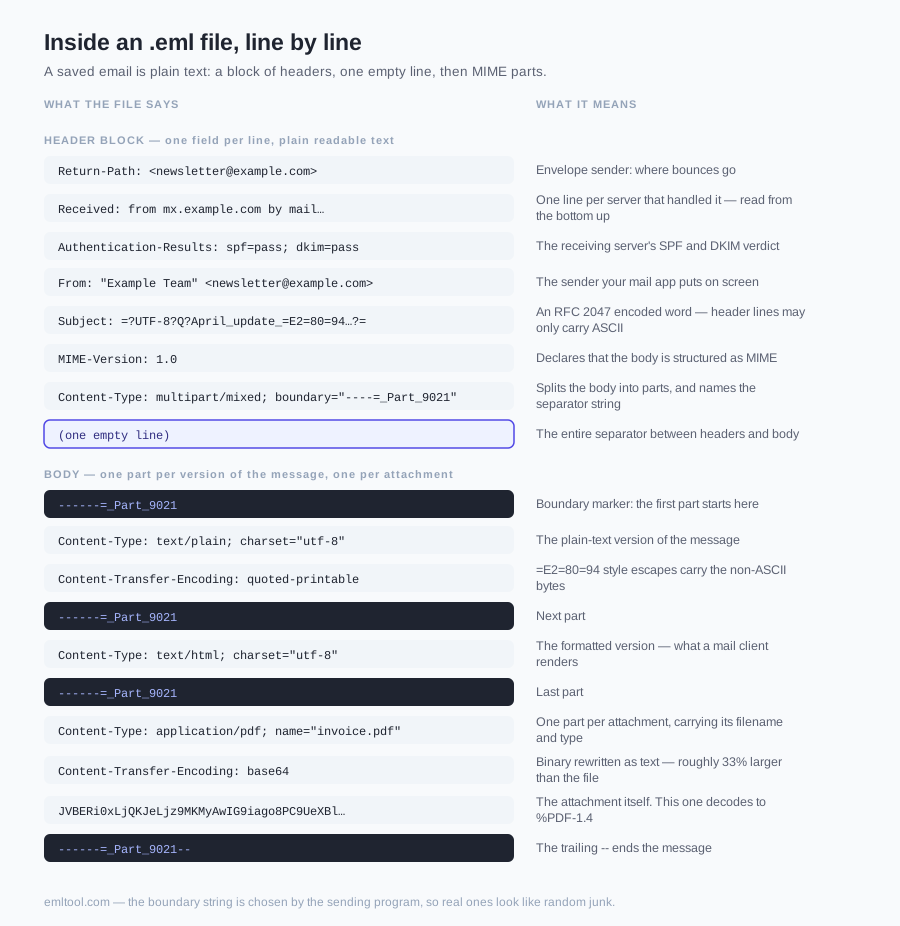
Return-Path: <newsletter@example.com>
Received: from mx.example.com (mx.example.com [203.0.113.25])
        by mail.yourcompany.com with ESMTPS id 4f2a1c9
        for <you@yourcompany.com>; Tue, 15 Apr 2025 09:14:02 +0000
Authentication-Results: mail.yourcompany.com;
        spf=pass smtp.mailfrom=example.com;
        dkim=pass header.d=example.com
Message-ID: <20250415091401.4f2a1c9@example.com>
Date: Tue, 15 Apr 2025 09:14:01 +0000
From: "Example Team" <newsletter@example.com>
To: you@yourcompany.com
Subject: =?UTF-8?Q?April_update_=E2=80=94_what=27s_new?=
MIME-Version: 1.0
Content-Type: multipart/mixed; boundary="----=_Part_9021"

------=_Part_9021
Content-Type: text/plain; charset="utf-8"
Content-Transfer-Encoding: quoted-printable

Hi there =E2=80=94 here is the April update.

------=_Part_9021
Content-Type: text/html; charset="utf-8"
Content-Transfer-Encoding: quoted-printable

<html><body><h1>April update</h1> ... </body></html>

------=_Part_9021
Content-Type: application/pdf; name="invoice.pdf"
Content-Disposition: attachment; filename="invoice.pdf"
Content-Transfer-Encoding: base64

JVBERi0xLjQKJeLjz9MKMyAwIG9iago8PC9UeXBlL1BhZ2UvUGFyZW50
IDEgMCBSL1Jlc291cmNlcyAyIDAgUi9NZWRpYUJveFswIDAgNTk1IDg0
------=_Part_9021--
Good to know: the boundary string (here ----=_Part_9021) is chosen by the sending program and declared in the Content-Type header. It can be anything, as long as it never appears in the content itself — which is why real ones look like random junk.
What do the headers in an EML file tell you?
This is the part a rendered email hides from you, and the reason .eml matters in security, HR and legal work: the headers record how the message actually travelled, not how it claims to have travelled. Paste a header block into the header inspector to walk the Received chain and SPF/DKIM stamps without uploading the message. The fields worth knowing:
| Header | Why it matters |
|---|---|
| Received | One line per mail server that handled the message, newest at the top. Read from the bottom up to trace the real route — the single most useful header when you suspect a forged sender. |
| Return-Path | The envelope sender: where bounces go. It often differs from the From address, and a mismatch is normal for newsletters but suspicious in a supposed one-to-one email. |
| Authentication-Results | The receiving server's verdict on SPF, DKIM and DMARC — pass, fail, none or softfail. A DKIM pass means the body and key headers were not altered after signing. |
| Message-ID | A globally unique identifier assigned at send time. Used to match an email against server logs, and to thread replies together via In-Reply-To and References. |
| Date | The sender's claimed send time, including their UTC offset. Compare it against the timestamps in the Received chain — a large gap can indicate a delayed or replayed message. |
| MIME-Version / Content-Type | Declares the message uses MIME and how the body is structured: multipart/alternative (text plus HTML), multipart/mixed (body plus attachments), or a single type such as text/plain. |
| Content-Transfer-Encoding | How the part was made safe for text transport: base64, quoted-printable, or 7bit. This is what turns readable content into blocks of letters and =XX sequences. |
| X-* headers | Vendor extensions — spam scores (X-Spam-Status), mailing-list IDs, campaign identifiers from marketing platforms. Non-standard, but frequently the most revealing part of a header block. |
Honest note:our viewer's header card shows the fields you normally care about — From, To, Cc, Subject and Date. To read the full Received chain and the SPF/DKIM verdicts, open the same .eml in any text editor: the header block is plain text at the very top of the file, before the first blank line.
Why does an EML file look like gibberish in Notepad?
Nothing is corrupted — you are looking at transport encoding. Each type of noise has a specific cause:
- Blocks of random-looking letters. That is base64: binary data (an attachment, an inline image, sometimes the whole HTML body) rewritten using only 64 safe characters so it survives text-only mail transport.
- Words broken by = signs. Quoted-printable encoding. A trailing = is a soft line break inserted to keep lines under 76 characters, and =E2=80=94 style sequences are the raw bytes of a non-ASCII character — that one is an em dash.
- Subjects like =?UTF-8?B?...?=. RFC 2047 encoded words. Header lines may only contain ASCII, so accented, Cyrillic, Greek or CJK subject lines are encoded and must be decoded before display.
- Repeated --_000_ lines. MIME boundary markers. Each one starts a new part of the message; the final marker ends with two extra dashes. They are how one file holds a text body, an HTML body and three attachments at once.
- Raw HTML tags. The HTML body is stored as literal markup. A text editor shows the source; a viewer renders it. Ours does that inside a sandboxed frame, with scripts and forms stripped out first.
A viewer's job is simply to undo all of that: split the parts, reverse the encodings, decode each part with its declared character set, and resolve inline images back into the HTML. Our viewer does it in JavaScript on your own machine, which is why it works with your network disconnected.
Where do EML files come from?
Almost nobody sets out to create one. They arrive as a by-product of saving, exporting or forwarding — which is exactly why people end up searching for what is an EML file after one lands in their Downloads folder:
- Gmail. Open a message, use the three-dot menu → Download message. Gmail hands you a .eml straight from its servers, headers intact.
- Outlook on the web. The download option on a message saves it as .eml. Classic Outlook for Windows is the odd one out — dragging a message to the desktop there produces .msg instead.
- Thunderbird. File → Save As → File, or simply drag a message from the message list into a folder on your desktop.
- Apple Mail. File → Save As with the Raw Message Source format, or drag a message out of Mail. Mail's own on-disk storage uses the .emlx variant.
- Forwarded as attachment. Corporate mail systems and helpdesks routinely attach the original message as an .eml when someone forwards it for review — this is the most common way people meet the format without asking for it.
- Archives and e-discovery. Backup tools, journaling systems and legal-hold exports produce directories full of .eml files, because it is the one format everything can read.
EML vs EMLX vs MSG vs MBOX
Five extensions cover nearly every "email saved as a file" situation. The practical difference is whether the format holds one message or a whole mailbox, and whether it is open text or a vendor's binary container:
| Ext | What it is | Created by | Opens with |
|---|---|---|---|
| .eml | One saved email in plain-text MIME (RFC 822/5322) | Gmail, Outlook on the web, Thunderbird, Apple Mail exports, mail servers | Any mail client, any text editor, this viewer |
| .emlx | An .eml wrapped with a byte-count line on top and an XML property list at the bottom | Apple Mail's internal storage on macOS | Apple Mail — and this viewer, which strips the wrapper automatically |
| .msg | Outlook's proprietary binary format (an OLE/CFB compound file, not text) | Outlook for Windows — drag a message to the desktop, or File → Save As | Outlook, or a dedicated parser like our MSG viewer |
| .mbox | A whole mailbox: many messages concatenated in one text file, each starting with a From_ line | Thunderbird folders, Gmail Takeout, Apple Mail exports, Unix mail systems | Thunderbird and desktop clients; split it into individual .eml files first to view single messages |
| .pst / .ost | Outlook's local mailbox database — folders, calendar, contacts and all messages in one file | Outlook for Windows | Outlook only. Export the message you need as .msg or .eml to work with it elsewhere |
The two you are most likely to be handed are .eml and .msg. If you have the Outlook one, our MSG viewer page covers how that format is built and what it costs you in portability.
How to open an EML file
Desktop mail clients (Thunderbird, Apple Mail, desktop Outlook) open .eml natively. Without one, you have three realistic routes:
- Drop it into a browser viewer. Our homepage viewer renders the message instantly on any operating system, with nothing uploaded. Best for a one-off file or a file you would rather not hand to a stranger's server.
- Attach it to a draft in Gmail or Outlook on the web. Both preview attached .eml messages. Good when you are already in webmail, weaker when you need exact formatting or raw headers.
- Install a free desktop client. Thunderbird opens .eml by double-click and is worth it if you have hundreds of files to work through rather than one.
For platform-specific walkthroughs — Chrome, Gmail, Outlook on the web, Windows, Mac, iPhone — see How to Open an EML File. If you need a permanent copy for a record or a filing, EML to PDF walks through the export.
Is it safe to open an EML file from someone you don't know?
An .eml is inert text on its own — it cannot run by being saved to disk. The risk lives in what happens when something renders it, and in where you send it to be rendered:
- Remote images are trackers.Opening the HTML body in a normal mail client fetches images from the sender's server, confirming your address is live. Our viewer strips scripts, blocks remote images by default and keeps remote CSS, fonts, media and SVG disabled. Loading remote images is an explicit opt-in because it can reveal your IP address, browser details and open time to the sender.
- Attachments are still attachments. Extracting a file from an .eml is safe; double-clicking the extracted macro-enabled document is not. The format carries whatever the sender attached.
- Uploading the message is its own risk.Most "free online EML viewer" sites POST your file to a server you know nothing about. For an HR complaint, a legal hold, a phishing sample containing colleagues' addresses, or anything under NDA, that upload is often the bigger problem than the email. Our parser runs in your browser — there is no upload endpoint to send it to.
FAQ
What is an EML file in simple terms?
It's one email, saved as a file. The .eml extension marks a message stored in the internet's standard email format (MIME/RFC 822): the headers (From, To, Subject, Date), the message body, and any attachments encoded as text — all in a single portable file.
What program creates EML files?
Almost every mail system: Gmail's 'Download message' produces one, Outlook on the web and Thunderbird save messages as .eml, Apple Mail exports them, and mail servers pass them around internally. If you've ever saved or been forwarded 'an email as a file', it was almost certainly an .eml.
Is it safe to open an EML file?
The file itself is just text, but its HTML body can contain tracking images and its attachments can contain anything an email can carry. Our viewer renders the body in a sandboxed frame and blocks scripts and remote resources by default. Do not load remote images or run attachments from a sender you do not trust.
Can I open an EML file in Word or Notepad?
Notepad will open it — as raw MIME source: readable headers followed by walls of base64 text for the HTML body and attachments. Word does no better. To see the email as an email, use a mail client or drop the file into our free viewer.
EML vs MSG — which one do I have?
Check the extension. .eml is the open standard, text underneath, made by most mail apps; .msg is Outlook's proprietary binary format, made when you drag a message out of Outlook for Windows. Our viewer opens both.
How big can an EML file get?
There is no limit in the format itself — an .eml is as large as the message it holds. Because attachments are base64-encoded, they take roughly 33% more space inside the file than the original binary, so a 10 MB PDF attachment produces an .eml of about 13.5 MB. Most mail servers cap outgoing messages at 20–35 MB, which is why saved emails are rarely bigger than that.
Can one EML file contain more than one email?
An .eml holds exactly one message — but that message can carry other messages as attachments (MIME type message/rfc822), which is what happens when a colleague 'forwards as attachment'. If you need a container for a whole mailbox, that's MBOX, not EML. Our viewer extracts nested messages so you can download and open them separately.