Double-click does nothing, or opens the wrong app
Windows hands .msg to whatever is registered for it. Without classic Outlook there is no native renderer — use the browser viewer instead of hunting for an association fix.
A .msg file is an Outlook message in Microsoft's proprietary binary format — which is why double-clicking it fails on most machines and renaming it never helps. To open a MSG file online, you need a parser — this page walks every working way. The fastest is to open it in the MSG Viewer on this site — parsing runs in your browser, uploads nothing, and works on Windows, Mac and phones alike.
🔒 100% in your browser · nothing uploads · no Outlook, no install, no sign-up
Open it in the MSG Viewer on this site — parsing runs in your browser. Sender, subject, formatted body, attachments with download buttons. No Outlook, no install, no upload.
Open your .msg file now →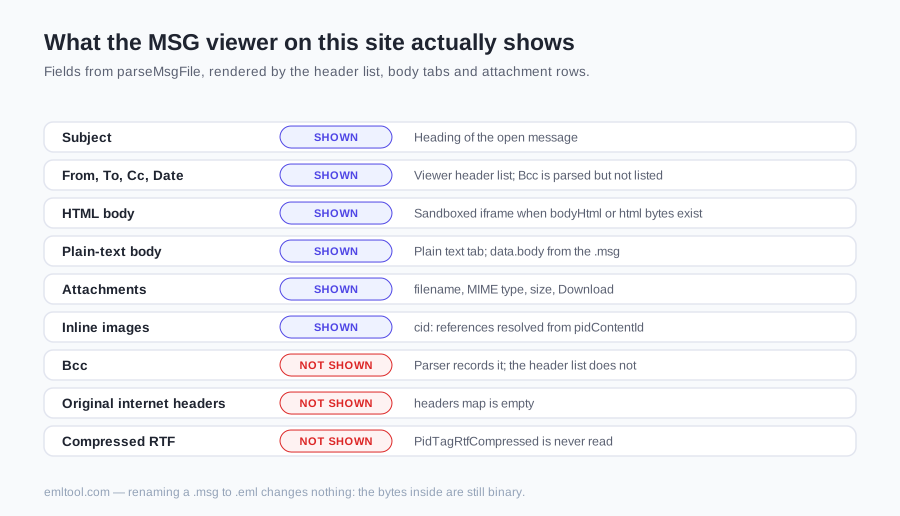
| Your situation | Best method | Install? | Trade-off |
|---|---|---|---|
| One .msg file, any device, right now | Browser MSG viewer (this site) | Nothing | Runs locally in the tab; nothing is uploaded |
| Windows PC with classic Outlook installed | Double-click the file | Already there | Opens in your live Outlook profile |
| Windows PC without Outlook | Browser viewer | Nothing | No native Windows renderer exists for .msg |
| Mac or iPhone | Browser viewer | Nothing | Outlook for Mac won't open a loose .msg; iOS has no handler |
| Hundreds of files to convert | Desktop converter utility | Desktop tool | Worth it for bulk only; overkill for one message |
| Untrusted or phishing-suspect message | Browser viewer | Nothing | Sandboxed body, remote content blocked, nothing touches your mail profile |
EML is an open, text-based standard nearly every mail system can read. MSG is different: an OLE compound binary used only by Outlook for Windows — dragging a message out of Outlook is what creates one. That is why the file feels cursed on any machine without classic Outlook: Windows itself has no native .msg renderer, Outlook for Mac won't reliably open a loose one, and iOS has no handler for the format at all.
The widely repeated fix — rename it to .eml — fails every time, because renaming changes nothing about the bytes inside: a MIME parser still finds binary where it expects text. The full format anatomy, down to the property streams, is on the MSG viewer page; the practical takeaway is simply that only a real MSG parser — Outlook or a browser-based one — can read the file.
Windows hands .msg to whatever is registered for it. Without classic Outlook there is no native renderer — use the browser viewer instead of hunting for an association fix.
Expected. The bytes are still OLE binary; the extension never mattered. Open the original .msg in a real MSG parser.
Usually a message whose body was stored only as compressed RTF — an older Outlook variant. The headers and attachments still parse; the body gap is a known format corner, not file corruption.
Different container (TNEF). No MSG parser reads it — ask the sender to resend as plain text or HTML.
A saved Outlook message is often exactly the kind of email someone cared enough to keep — contracts, HR threads, legal correspondence. Uploading it to a random converter site to read it is a strange trade. Open it in the MSG Viewer on this site — parsing runs in your browser: nothing is uploaded, remote content in the message body is blocked by default, and closing the tab removes everything from memory. You can load that page, go offline, and it still works — that is the proof, not a policy promise.
Open it in the MSG Viewer on this site at /msg-viewer — parsing runs in your browser. Sender, subject, body and attachments render there. The parser is JavaScript running on your device — no Outlook licence, no install, and the file is never uploaded to a server.
Yes. Outlook is only required if you insist on opening the file natively on Windows. A browser-based MSG parser reads the same binary format without Outlook — which is the only practical route on a Mac, an iPhone or an Android phone, where Outlook won't open a loose .msg anyway.
Because renaming changes nothing about the bytes inside. A .msg is a Microsoft OLE compound binary file; .eml is plain MIME text. After the rename, a mail app still finds binary data where it expects text and shows garbage or an error. Only a real MSG parser helps.
Not natively — Outlook for Mac won't reliably open a loose .msg and iOS has no handler for the format at all. A browser viewer is the working route: Safari on Mac, Safari on iPhone and Chrome on Android all run the same in-browser parser.
In a browser viewer with a sandboxed body, yes — it is the cautious option. Opening an untrusted message in your live Outlook profile exposes your real mail environment; a client-side viewer renders the content inert, blocks remote resources by default, and forgets everything when the tab closes.
No. winmail.dat is TNEF, a different Microsoft container that appears when Outlook sends rich-text mail to a non-Outlook recipient. A MSG parser does not read it. Use the winmail.dat opener on this site to unpack the attachments, and ask the sender to resend as plain text or HTML so it stops happening.
Last checked: August 9, 2026.