MSG to EML Converter — Open the .msg, Click Save as .eml
Drop an Outlook .msg below. The viewer parses it in this tab and shows the headers, body and attachments. Click Save as .eml in the message header and you get a standard MIME file — From, To, Cc, Subject, Date, the text and HTML bodies, and the attachments. No file leaves your device — parsing runs in this tab.
Drop .eml, .emlx, .msg or .mbox files here — or click to choose
Opens instantly. Your files never leave this device — parsing runs 100% in your browser.
Why convert a .msg to .eml at all
A .msgfile is Outlook's binary OLE compound file. A .eml file is plain-text MIME (RFC 5322) that Thunderbird and Apple Mail open directly, and that Gmail displays when the .eml arrives as an attachment. That is what you want for a mailbox archive outside Outlook, for handing a message to someone without Outlook, and for legal hold / discovery workflows where a text-based, diff-able copy is easier to review than a binary one.
Renaming .msg to .eml converts nothing — the bytes stay binary. Keep the original .msg if you still need Outlook-only fields. What Is an EML File? explains the portable format field by field.
What carries over
Date is taken from the message's delivery time (messageDeliveryTime), or the client submit time if there is no delivery time, written as an RFC 2822 Date header in UTC (always +0000). If neither exists the Date header is omitted. From is the sender name and address (Name <addr>, or just the address). To and Cc are recipients joined with commas, folded one mailbox per line when long; non-ASCII display names become RFC 2047 encoded-words. Subject is RFC 2047-encoded when it contains non-ASCII characters, and omitted when empty.
The plain-text body (Outlook's text body) is a text/plainpart, UTF-8, quoted-printable. The HTML body (Outlook's HTML body, when the message has one) is a text/html part, UTF-8, quoted-printable. Both present → multipart/alternative with text/plain first, then text/html. HTML only → a single text/html. Text only, or nothing → a single text/plain (empty body if nothing).
Every attachment that Outlook did not mark hidden — plus hidden ones that have a Content-ID (inline images) — is written as a base64 part (76-character lines) with its filename (RFC 2231 encoding for non-ASCII names) and MIME type when Outlook stored one, otherwise application/octet-stream. Attachments with a Content-ID get Content-Disposition: inline and a Content-ID header so HTML that references cid: images keeps working; the rest get Content-Disposition: attachment.
| Field | Written as |
|---|---|
| Date | messageDeliveryTime, else clientSubmitTime, as RFC 2822 UTC (+0000). Omitted if neither exists. |
| From | Sender name and address (Name <addr>, or just the address). Non-ASCII names become RFC 2047 encoded-words. |
| To / Cc | Recipients joined with commas, folded one mailbox per line when long. RFC 2047 display names. |
| Subject | RFC 2047-encoded when it contains non-ASCII characters; omitted when empty. |
| Plain-text body | text/plain part, UTF-8, quoted-printable. |
| HTML body | text/html part, UTF-8, quoted-printable, when the message has one. |
| Both bodies | multipart/alternative with text/plain first, then text/html. |
| Attachments | Non-hidden, plus hidden with a Content-ID; base64 in 76-character lines. |
What does not carry over
Bcc: the parser records the Bcc recipients, but the viewer header does not show them and the .eml builder writes only From, To and Cc — Bcc is not written to the file. Original internet headers — the Received chain, the original Message-ID, DKIM/Authentication-Results, X- headers — are not taken from the .msg. The .eml gets a Message-ID generated by this site: a hash of the subject and date, ending in @emltool.local. So the .eml is a rebuilt message, not the original transport artifact; for header-level forensics keep the .msg.
Time zone: the Date header is always written in UTC (+0000), so the original local offset is not preserved (the instant is). RTF body: Outlook's compressed RTF (PidTagRtfCompressed) is never read. If the message stores HTML as HTML, the HTML is kept; if the formatting lived only in RTF, you get the plain-text body; if there is no plain text either, the .eml has an empty text/plain part. MAPI properties — categories, follow-up flags, importance, sensitivity, read/unread state, conversation index and every other Outlook-only property — are not used and have no MIME equivalent here; they are dropped.
Hidden attachments without a Content-ID are filtered out before the file is built (they usually are Outlook's own bookkeeping objects, not user files). Embedded Outlook items (a message attached as an item rather than as a file): the msgreader library re-serialises the embedded item as a standalone .msg and it lands in the .eml as an ordinary base64 attachment. It is not turned into a nested message/rfc822part and not converted to .eml itself. Because the builder takes the filename from the attachment's long/short filename property and Outlook commonly writes none for an embedded item, that attachment is then named attachment-N with type application/octet-stream — rename it to .msg after download and open it here separately. Attachments whose bytes cannot be read from the container are written with zero bytes rather than aborting the file.
How the file is rebuilt
The MIME structure is a header block (Date, From, To, Cc, Subject, Message-ID, MIME-Version: 1.0, then the Content-Type of the top part), one blank line, then the body. A text-plus-HTML body is multipart/alternative (text then HTML) with boundary lines; that entity plus the attachment parts is multipart/mixed. Everything is CRLF line endings, pure 7-bit ASCII (non-ASCII text is quoted-printable / base64 / RFC 2047), no line longer than 998 characters, base64 in 76-character lines.
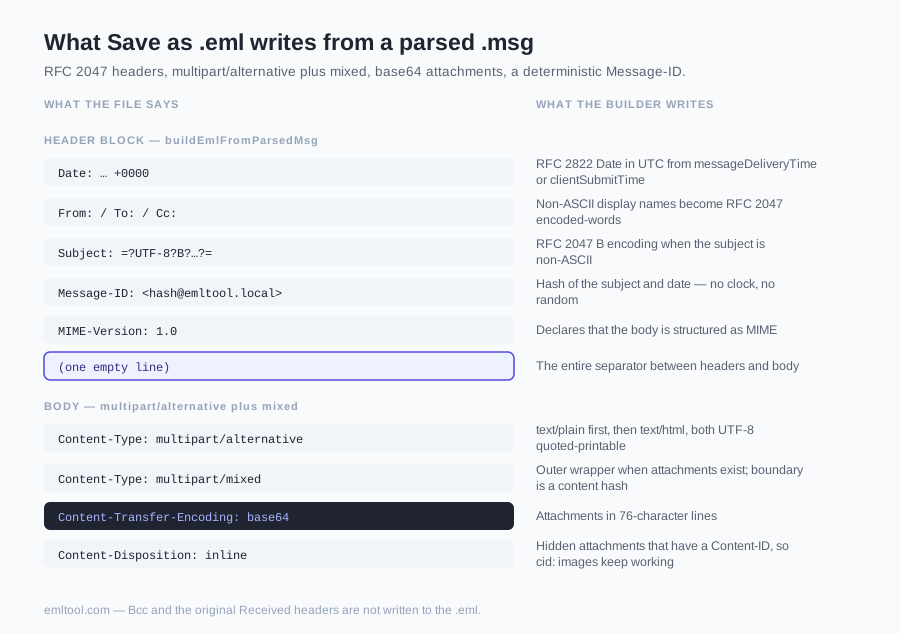
The MIME boundaries are a hash of the text, the HTML and the attachment names and sizes; the Message-ID is a hash of the subject and date. Neither uses the clock or a random number, so converting the same .msg twice yields byte-identical .eml files. The test script scripts/test-msgToEml.mjsfeeds a synthetic parsed message through the builder and back through this site's own EML parser and checks subject, addresses, both bodies and attachment bytes round-trip. After you have the .eml you can print it to a PDF.
One message at a time
The drop zone accepts several files at once and they stack in the sidebar (mixed .eml/.emlx/.msg/.mbox is fine), but Save as .eml writes only the message that is currently open; there is no "download all as zip" button on this page. To convert ten .msg files you click through them and press the button ten times.
The download name is the subject lowercased with everything but a-z0-9 turned into dashes (max 80 characters), or message-<n>.eml when that leaves nothing — no subject, or a subject without a single a-z0-9 character (n is the message's number in this tab). Hundreds of files are a job for a desktop script, not a browser tab.
Privacy: nothing is uploaded
The .msg parser and the .eml builder are JavaScript loaded into this tab. The file is read into memory with the browser's File API (file.arrayBuffer()) and the .eml is produced as a Blob download from the same tab. There is no upload endpoint for the viewer, no account, no server-side copy.
Close the tab and the bytes are gone from here. That matters because .msg files are often internal mail.
FAQ
Do I need Outlook installed to convert a .msg to .eml?
No. The .msg parser and the .eml builder are JavaScript that run in this tab. Outlook is not called, is not required, and is not used as a conversion backend. Drop the file above, wait for it to open, then click Save as .eml in the message header. The same path works on a Mac or a phone, where Outlook for Windows is not available.
Is my .msg file uploaded to your server?
No. There is no upload endpoint for the viewer, no account, and no server-side copy of the message. The browser reads the file into memory with the File API; the parser and the builder run in this tab; the .eml is produced as a Blob download from the same tab. Close the tab and the bytes are gone from here. That matters when the .msg is internal mail you would rather not hand to a conversion service.
Do attachments survive the conversion?
Yes, with the limits listed above. Every attachment Outlook did not mark hidden is written into the .eml as a base64 part, and hidden attachments that have a Content-ID — the inline images — go with them so cid: references in the HTML keep working. Hidden attachments without a Content-ID are filtered out; they are usually Outlook bookkeeping, not user files. An embedded Outlook item is re-serialised as a standalone .msg and lands as an ordinary attachment — named attachment-N when Outlook stored no filename for it, which is the usual case: it is not nested as message/rfc822 and is not itself converted to .eml. Attachments whose bytes cannot be read from the container are written with zero bytes rather than aborting the file.
Why does the .eml have a different Message-ID and no Received headers?
Because this site does not carry the original internet headers over from the .msg. The Received chain, the original Message-ID, DKIM/Authentication-Results and X- headers are not in the parsed object. The builder writes a new Message-ID: a hash of the subject and date, ending in @emltool.local. The .eml is a rebuilt MIME message, not the original transport artifact. Keep the .msg if you need header-level forensics.
What happens if the message only has an RTF body?
Outlook's compressed RTF body (PidTagRtfCompressed) is never read. If the message also stores HTML as HTML, that HTML is kept. If the formatting lived only in RTF, you get the plain-text body. If there is no plain text either, the .eml has an empty text/plain part. Headers and attachments still convert; the original .msg is unchanged.
Can I convert many .msg files at once?
The drop zone accepts several files at once and they stack in the sidebar — mixed .eml, .emlx, .msg and .mbox is fine. Save as .eml writes only the message that is currently open. There is no download-all-as-zip button on this page. To convert ten .msg files you click through them and press the button ten times. Hundreds of files are a job for a desktop script, not a browser tab.
Will the .eml open in Thunderbird, Apple Mail or Gmail?
The output follows the RFC 5322 / MIME rules listed on this page: CRLF line endings, pure 7-bit ASCII (quoted-printable, base64, RFC 2047), no line longer than 998 characters, and base64 in 76-character lines. A synthetic parsed message is fed through the builder and back through this site's own EML parser in scripts/test-msgToEml.mjs, which checks subject, addresses, both bodies and attachment bytes round-trip. We have not shipped a per-client compatibility fixture, so if a client rejects a specific file, the original .msg is still intact and the MSG Viewer page at /msg-viewer shows what was in it.